Official game
Play Cutout Village
This game is hosted by Steam. Continue to the official page to play or download it.
Wishlist on SteamOverview
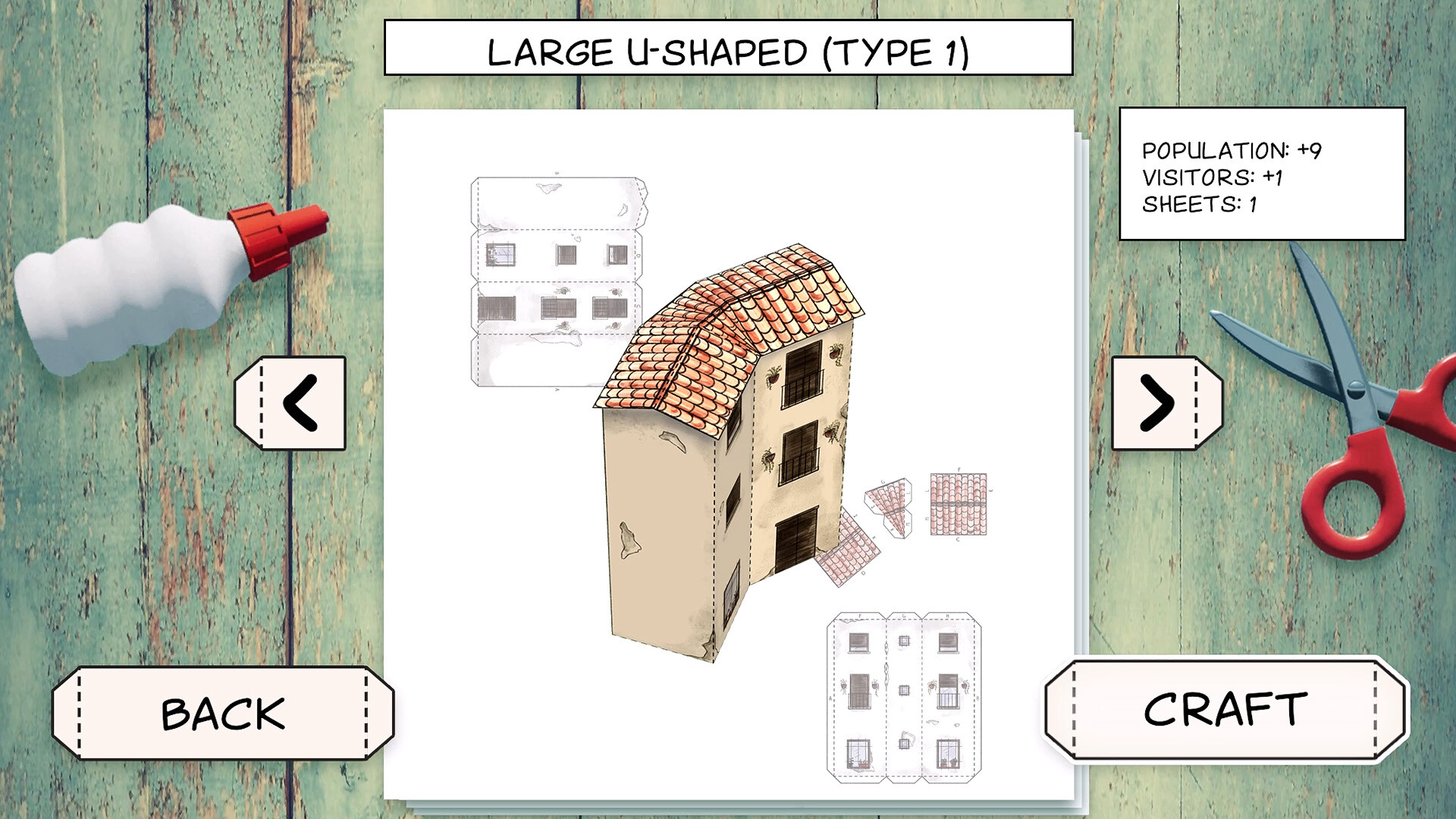
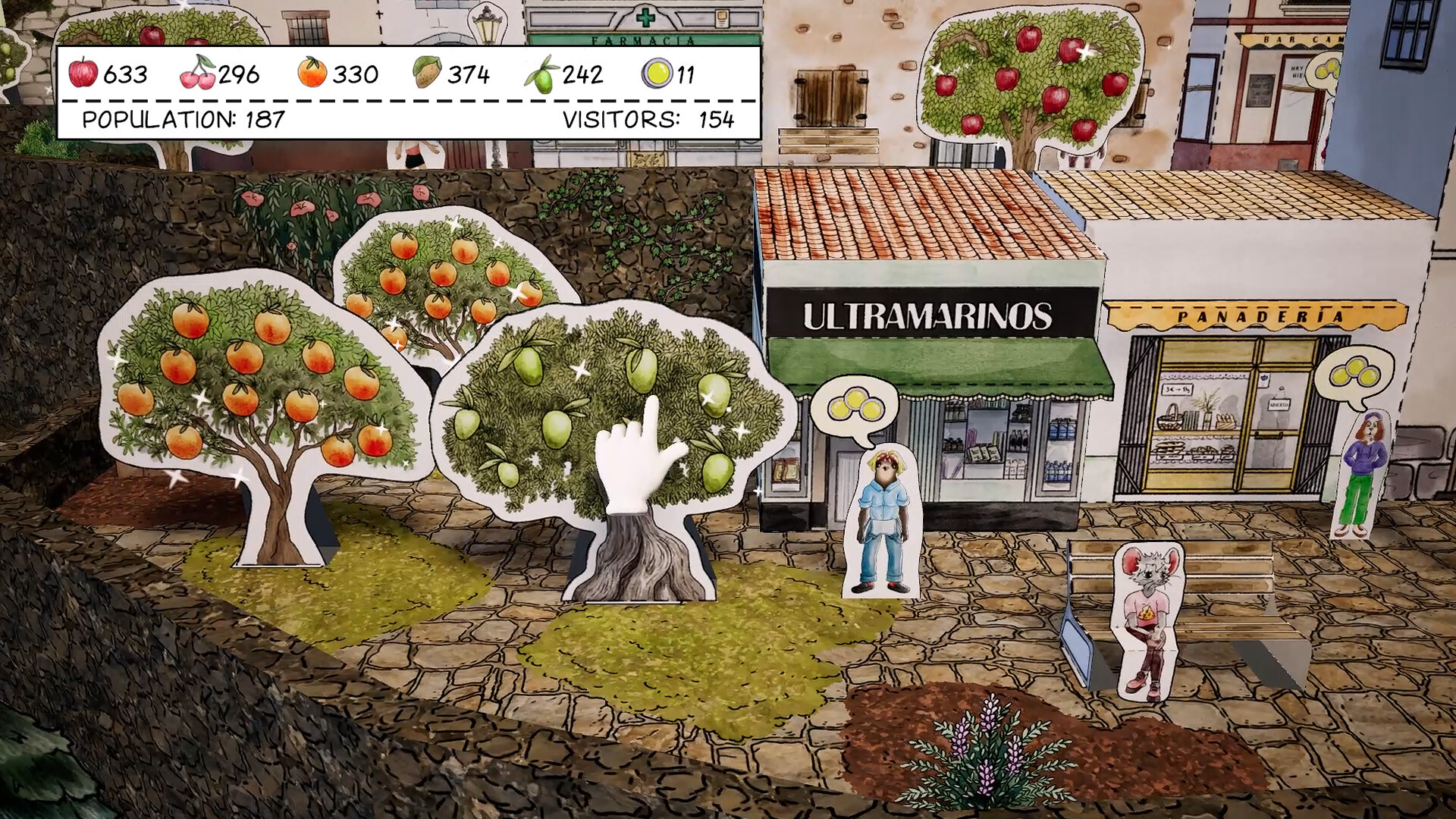
Cutout Village is a city-builder where construction is literal. Every building in your village exists as a paper sheet, and growing the place means cutting the sheet, folding the pieces, and gluing them together. DevilishGames, a Spanish studio with two decades of small-game history, built the whole experience around traditional papercraft and the cutout books that filled European newsstands through the twentieth century. The result is part relaxing management game, part love letter to a craft most games never touch.
The framing story gives the crafting a reason. Your protagonists inherit an old family home in the village where they spent their childhood, and they arrive to find the place nearly deserted, hollowed out by rural depopulation. Restoring the family home becomes restoring the village, one paper building at a time. It launches into Steam Early Access on October 21, 2026, and the story mode demo is already playable.
The game has no timers, no fail states, and no scores, which means the optimization question changes shape. You cannot lose. What you can do is waste sheets, misplace services, stall your unlock pipeline, or miss the half of the game that exists at your kitchen table. This guide covers how to play it well instead of just playing it.
| Fact | Detail |
|---|---|
| Developer / Publisher | DevilishGames (Spain) |
| Genre | Relaxing paper-craft city-builder with narrative |
| Platform | Windows (Steam) |
| Release date | Early Access on October 21, 2026; demo available now |
| Buildings | 50+ unlockable buildings, services, and decorations |
| Signature feature | Every in-game building downloads as a printable real-world papercraft PDF |
| Visual style | Watercolors, paper models, handmade-book textures |
| Structure | Story mode levels plus free building, Early Access roadmap |
| Extras | Companion papercraft book series on Amazon (4 books, 50+ models) |
| Accessibility | No timed input, controller support, keyboard-only option |
| Min specs | i5 CPU, 8 GB RAM, 2 GB GPU, 4 GB storage |
Who it is for: cozy game players who want more structure than a sandbox, papercraft hobbyists who want the craft digitized, city-builder-curious players bounced off Anno's tax screens, and parents looking for a builder to share with kids.
Who it is not for: optimization cravers. There is no production chain math here, and the game says so plainly: no heavy pressure, no complicated management systems.
Getting Started
The demo includes a full story mode level and walks you through the core loop. Wishlist now, and grab the demo before Early Access to see whether the crafting rhythm clicks for you. Demo progress does not carry into Early Access; October 21 is day one.
Your first session plan
- Do the tutorial builds slowly on purpose. The cut-fold-glue interface has its own rhythm, and rushing it is the only way to make this game frustrating. Early accuracy builds the muscle memory you will use fifty times over.
- Follow the story objectives until the family home is restored. The narrative unlocks building types in a deliberate order. Free-building before the story introduces services means placing structures you cannot staff.
- Place services where villagers already walk. The village simulation is light but real. A service activates where people are, not where the map looks empty. Watch the paths your paper residents take before placing anything.
- Try one PDF download early. Printing a real papercraft house after unlocking it in-game is the moment the concept lands. It also shows you exactly how the digital folding maps to physical craft.
- Collect every sheet you pass. Sheets are the raw material for new builds. Skipping pickups slows your catalog growth more than anything else you can do wrong.
Beginner mistakes to avoid
- Treating it like a grid city-builder. Roads and zoning rules do not exist here. Buildings sit where the terrain and your sense of composition put them. Fighting that freedom with SimCity instincts wastes the game's charm.
- Hoarding decorations for later. Nothing punishes early decoration. If a bench makes you smile, place the bench.
- Free-building before the story teaches services. Unstaffed service buildings just sit there. The story order exists to introduce residents before the buildings that serve them.
- Skipping the paper collection loop. The sheets you gather along the way are your build budget. A village grows as fast as its sheet economy.
- Playing marathon sessions. This is a tea-length game by design. Two story levels per sitting is the intended dose; the papercraft PDFs extend a session naturally if you want more.
Core Mechanics
Cut, fold, glue: the building loop
Construction starts with a paper sheet on your workbench. Cutting follows the printed lines, folding creases the pieces into three dimensions, and gluing assembles the final building. Each step is a small tactile interaction rather than a menu click, and the game's whole identity lives inside that difference. Where another builder plays a placement animation, Cutout Village makes you assemble the thing you are placing. Over fifty buildings, services, and decorations follow this loop, from tiny houses to a huge castle.
The loop never speeds up on you. A building gets built when you finish building it. That sounds like a limitation; in practice it turns the workbench into the game's meditative core, the same way puzzle games use their board.
Village restoration as progression
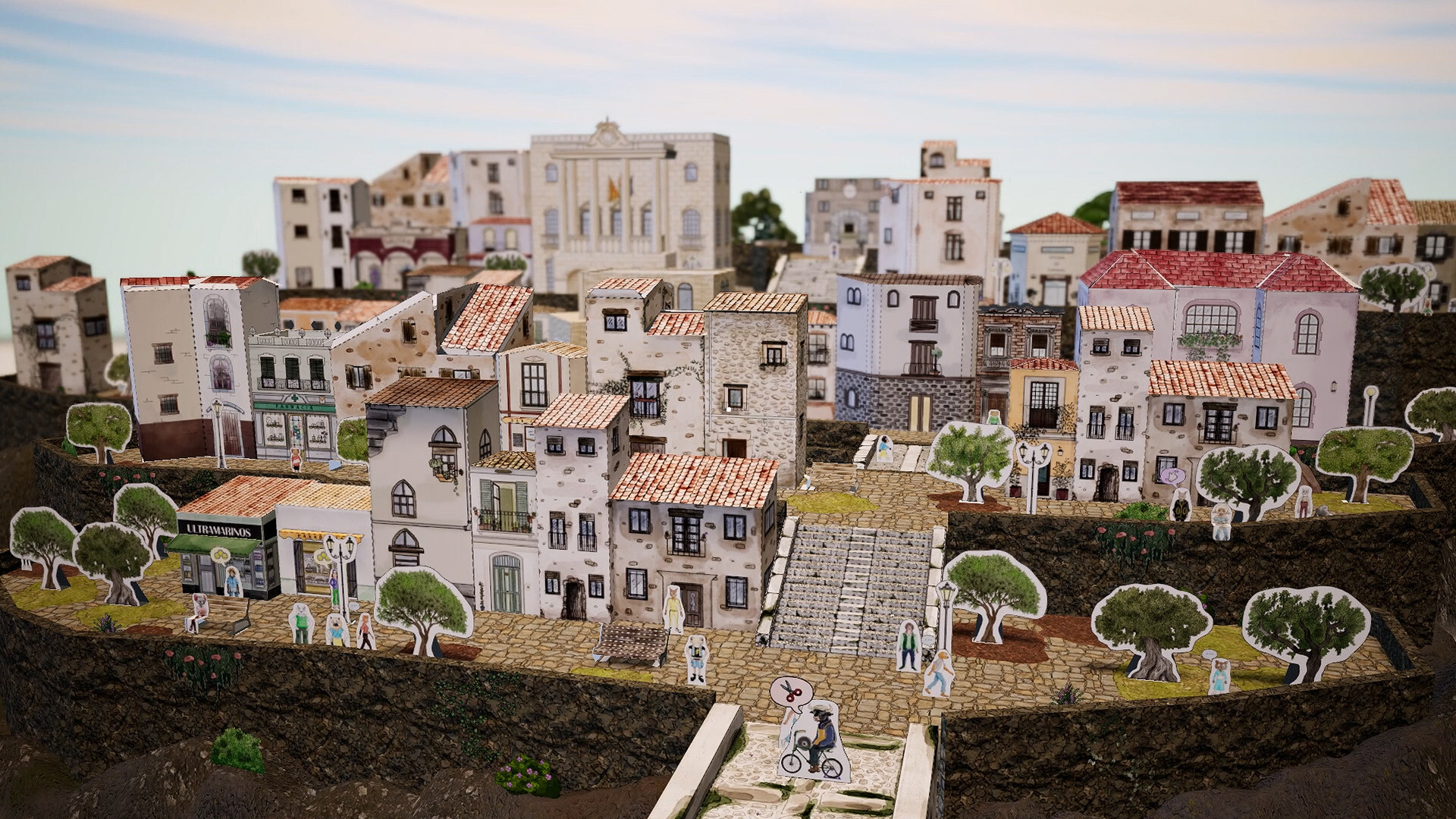
Progress ties to the story of the depopulated village. Each restored building brings the place closer to life: services attract residents back, residents need more services, and the map slowly fills. The narrative beats between builds give context the sandbox genre usually skips. You are not an invisible mayor. You are someone who inherited a childhood home and decided the village deserved a second life.
The restoration chain rewards reading ahead. Residents unlock demand for specific services, and services unlock new building categories. Players who track which service the next story beat introduces can pre-plan placement, saving a repositioning pass later. There is no penalty for moving buildings, but there is a real cost in re-walking your village and re-reading its walking paths.
The papercraft bridge: print your village
The feature nobody else ships: every building you unlock exists as a downloadable PDF. Print it, cut it out, fold it, and your village exists on your desk. The demo's buildings already support this, and the same system backs the four commercial papercraft books DevilishGames published on Amazon, which contain over fifty constructions including houses, shops, characters, trees, and a castle. For families and crafters this converts a game purchase into a hobby pipeline. No other city-builder on Steam does anything like it.
Practical notes for the real-world half:
- Print on paper between 160 and 250 gsm. Standard printer paper folds but sags; cardstock holds walls square.
- Score fold lines with a dead pen or ruler edge before folding. The in-game creasing step teaches the same motion.
- White glue applied thin with a toothpick beats glue sticks for the small tabs.
- Start with the smallest house. The castle is genuinely advanced; it is the final boss of the papercraft books.
A gentle management layer
Under the crafting sits light simulation. Services matter, placement matters, and the villagers' daily patterns reward thoughtful town planning. But the management never escalates. There is no budget crisis, no happiness meter collapse, no fail state. The studio's pitch is build at your own pace, and the mechanics honor it.
The villager simulation follows day-night rhythms. Shops and services show life during waking hours and go dark at night, which gives placement feedback for free: a bakery on the walking network glows with activity, a bakery on the wrong hill stays dim. Watch a full cycle before judging a placement.
Watercolor presentation
The visual stack is watercolor backgrounds, textured paper models, and a handmade-book frame for the menus. The art direction does double duty: it makes the game look like the physical craft it imitates, and it ages the aesthetic deliberately, like a picture book from decades ago. Screenshots undersell it. The folding animations in motion are the selling point.
Progression Strategy
The unlock pipeline
- Story beats gate building categories. Push the narrative to unlock service buildings before spending sheets on duplicates of what you have.
- Sheets are the budget; story is the faucet. Every story level pays out sheets and unlocks. If you are sheet-poor, do the next story objective instead of grinding pickups.
- One of each service first, decoration second, duplicates last. Coverage beats density in a village this size. A second bakery adds less than the first chapel.
- Save the castle for late. It consumes an enormous sheet pile and crowns the skyline. Build toward it; do not start with it.
- Match the Amazon book order if you own both. The papercraft series follows the same catalog as the game. Owning the books lets you scout upcoming builds and pre-plan village layout around the big pieces.
Session rhythm
| Session length | What to do |
|---|---|
| 15 minutes | One story beat, one new building, one PDF print |
| 30-45 minutes | Two to three story levels, service placement pass, decorate a street |
| Long weekend | Finish the demo, start planning your Early Access layout on graph paper |
The game supports all three. There is no daily login pressure, no event calendar, no decay.
Build Orders and Step-by-Step Strategy
These sequences assume the demo's story structure; Early Access expands the catalog but keeps the loop.
Sequence 1: The model first day
- Start the story level and complete the tutorial house without skipping any cut or fold step.
- Walk the existing paths. Note where the two or three residents loop.
- Place your first service on the busiest intersection of those loops.
- Print its PDF while the placement settles in. Physical and digital progress reinforce each other.
- End the session after decorating the street you just serviced. Screenshot at golden hour.
Sequence 2: The service web
- Unlock the second service category through the story.
- Place it adjacent to, not on top of, the first service's catchment. Overlap wastes nothing here, but separation spreads life across more of the map.
- Route a decoration path (benches, lamps, trees) between the two services. Villager traffic will follow the visual corridor, and the village starts reading as a place rather than a collection.
- Watch one full day-night cycle before placing anything else.
- Adjust one building. Repeat.
Sequence 3: The sheet economy
- Sweep the map edge to edge once per session for sheets. They respawn with story progress.
- Never let your sheet count drop below the cost of the next story unlock. Check the catalog for upcoming costs.
- Bulk-build when sheets are plentiful: queue three structures in one sitting while the crafting rhythm is warm. The interface rewards flow state.
- When sheets run dry, switch to PDF printing of what you already built. The physical backlog keeps the hobby going between digital unlocks.
Sequence 4: The family home centerpiece
- Prioritize story objectives until the family home restoration unlocks.
- Build it as the geographic anchor of your village. Everything else radiates from it in the story's own logic.
- Place its surrounding decorations first (garden, fence, path), then let services fill outward.
- The home is also the emotional payoff of the demo; do it in one unhurried sitting.
Sequence 5: Preparing for Early Access day one
- Finish the demo's full story level.
- Download and print your three favorite buildings physically. You now know the fold difficulty curve.
- Sketch your ideal village layout on paper: where the castle goes, where the market square forms, where the river of paths runs.
- Wishlist and let the store page notify you on October 21. Start fresh; the story reopens with the full catalog.
Advanced Tips
Read the walking simulation before placing services. Villagers walk realistic routes between where they live and what exists. A service off the network still functions but feels dead. One day-cycle of observation tells you more than any placement theory.
Batch crafting sessions by building type. The cut-fold-glue interface rewards rhythm. Doing three houses in a row trains the pattern; alternating house, castle, house breaks flow.
Use the free camera for composition, not just placement. The village reads best from low angles at golden hour. There is no photo mode, but the camera pans freely and the paper textures hold up close. Your screenshot folder is the game's real endgame.
The books are strategy guides for the game. Players who own the four-volume papercraft series can see build difficulty and piece counts before unlocking in-game. Use the books to plan which buildings anchor each district.
Decorate during story lulls, not after. Story beats take a moment to trigger. Filling the wait with a bench or a tree keeps the village cohesive instead of leaving decoration as a chore for the end.
Keep the physical and digital villages in sync. The satisfaction loop compounds when your desk model matches your screen. Build digitally, print, then place the physical model next to the monitor.
The Demo: What You Get
The demo delivers one complete story mode level with the full cut-fold-glue loop, PDF downloads included. It toured through the Six One Indie Showcase with a new trailer, and the team extended demo availability through Steam Next Fest (June 15 to 22) before its final pre-release window. If the demo's rhythm grabs you, the Early Access version doubles the building catalog and opens the free-build layer.
Controls and Accessibility
Mouse-driven at its core, with full controller support for couch play. The Steam categories matter here: Keyboard Only Option and Playable without Timed Input are both checked, plus custom volume controls and Steam Cloud. Nothing in the game requires speed. It is one of the few builders genuinely playable one-handed or with limited dexterity, which fits the audience the papercraft bridge attracts.
System Requirements
| Tier | Minimum |
|---|---|
| OS | Windows 10 |
| CPU | Intel Core i5 |
| RAM | 8 GB |
| GPU | 2 GB VRAM |
| Storage | 4 GB |
Trivially light. This runs on a decade-old laptop, which suits a game whose real-world half happens at the kitchen table.
Developer Background: DevilishGames
DevilishGames is a Spanish independent studio shipping small games since the Flash portal era, with a catalog spanning browser classics to Steam titles. Cutout Village is their most personal project in years: the papercraft books accompanying it come from the same designers, and the studio premiered trailers through indie showcases (Second Wind Games Showcase, Six One Indie Showcase) rather than big publisher events. The Amazon book series, four volumes covering more than fifty paper constructions, doubles as marketing and as proof the team understands the craft beyond screen-deep imitation.
How It Compares
| Game | Shared DNA | Where Cutout Village differs |
|---|---|---|
| Townscaper | Pure aesthetics, no fail state | Cutout Village adds a story and a crafting verb; more game |
| Dorfromantik | Cozy pacing, tile-adjacent satisfaction | No score chase; the papercraft bridge replaces the leaderboard |
| Cities: Skylines | Buildings and services | No traffic, economy, or disasters; the comparison ends at "buildings" |
| Unpacking | Tactile object interaction, narrative through placement | Cutout Village scales up from a room to a village and exports to reality |
FAQ
When does Cutout Village release? Steam Early Access on October 21, 2026. Price not yet announced.
Is there a demo? Yes, with one full story mode level and working PDF papercraft downloads.
Do I need to be good at crafts to enjoy it? No. The in-game crafting is simple interactions. The real-world PDFs are optional and range from easy houses to a complex castle.
Does the game force time pressure? None. No timers, no fail states, playable without timed input.
Can I print the buildings? Every unlocked building comes as a downloadable PDF sheet designed for printing, cutting, folding, and gluing.
What paper should I print on? 160 to 250 gsm. Printer paper folds but sags; light cardstock holds walls square. Score the fold lines first.
What is the story about? Siblings inherit their childhood family home in a nearly abandoned village and rebuild the community through paper crafting.
How many buildings are there? Over fifty buildings, services, and decorative elements at Early Access launch, up to and including a huge castle.
Does demo progress carry over? No. Finish the demo for the mechanics and the story's opening, then start fresh on October 21.
Will console versions come? Not announced. Windows Steam only for now.
Is it good for kids? Yes. The crafting teaches real papercraft basics, the reading level is gentle, and the physical PDF crafts make it a strong parent-child activity.
Quick Reference
| Topic | Answer |
|---|---|
| Release | Early Access, October 21, 2026 |
| Demo | Live now, one full story level |
| Core loop | Collect sheets, cut, fold, glue, place |
| Buildings | 50+ at launch, castle included |
| Signature | Printable PDF papercraft for every building |
| Pressure | Zero timers, zero fail states |
| Best paper | 160-250 gsm cardstock |
| Placement rule | Services on villager walking paths |
| Accessibility | No timed input, controller + keyboard-only options |
| Specs floor | i5, 8 GB RAM, 2 GB GPU, 4 GB storage |
Screenshots